
To arrange package pickup right now, go to your carrier's pickup page, USPS.com for mail, UPS.com for On-Call Pickup, or FedEx.com for a scheduled or on-call request, and choose free next-delivery pickup or a paid two-hour window. Sign in, enter your address and package details, then confirm. You'll get details on every carrier, the rules, and a faster app-based option below.
TL;DR:
- USPS requires at least one paid service like Priority Mail for free pickup and offers an on-demand service with a guaranteed two-hour window for an extra fee.
- Oversized, overweight, or poorly accessible packages can cause pickup rejections or surcharges across all carriers, especially during holidays or at restricted buildings.
- Modifications or cancellations must be completed before specific cut-off times, such as 2:00 a.m. for USPS free pickup or 5:00 a.m. for USPS on-demand, and require the confirmation number.
- Accurate package details, prepaid labels, and accessible pickup locations are essential for smooth pickup and to avoid delays or disputes.
- On-demand app services like Halen provide immediate pickups with transparent upfront pricing, ideal for time-sensitive or unpredictable shipping needs.
Table of Contents
- Carrier Quick Paths: USPS, UPS, FedEx, and Shipping Platforms
- Step-by-Step: How to Schedule a Pickup in Minutes
- What Determines If a Pickup Is Free, Paid, or Rejected
- How to Modify, Reschedule, or Cancel a Pickup
- Prep Checklist: What to Do Before the Driver Arrives
- When an On-Demand App Beats Waiting on Carrier Routes
- Skip the Wait With On-Demand Pickup Through Halen
- Carrier Pages Worth Bookmarking
- Sources
- FAQ
Carrier Quick Paths: USPS, UPS, FedEx, and Shipping Platforms
Each carrier handles pickup requests a little differently, and picking the wrong path costs you time.
- USPS: Schedule free next-delivery pickup at usps.com/pickup as long as you're shipping at least one qualifying paid service like Priority Mail. Need it faster or on your schedule? Pickup On Demand lets you book a two-hour window for a per-trip fee, though USPS doesn't guarantee your carrier hits that window on the dot.
- UPS: On-Call Pickup covers one-time pickups you book online or by phone. Same-day requests cost more than future-day ones, and residential addresses often carry an extra surcharge.
- FedEx: Offers both on-call pickups for occasional shippers and scheduled pickups tied to a business account, with account tools that remember your address and package habits.
- Shipping platforms (Shippo, ShipStation, Pirate Ship): Scheduling usually lives right in the shipping dashboard next to your label purchase. These tools ping the carrier's own availability and scheduling APIs behind the scenes, then hand you off to the carrier's confirmation screen when needed.
Step-by-Step: How to Schedule a Pickup in Minutes
Most carriers and platforms follow the same basic sequence, whether you're arranging one box or setting up a standing weekly pickup.
- Sign in or create an account. This matters more than it sounds. An account lets you save addresses, view pickup history, and edit or cancel requests later without starting over.
- Choose your service type. Decide between free next-delivery pickup, a paid on-demand window, or a recurring pickup if you ship often.
- Enter your pickup address and drop location. Specify exactly where the driver should find your packages, front porch, mailroom, loading dock.
- List package count, weight, and dimensions. Carriers use this to plan route capacity, so accurate numbers matter.
- Confirm prepaid postage or labels are attached. Pickup services generally require this before the driver ever shows up.
- Submit and save your confirmation number. This is your proof of request and your key if you need to modify anything later.
Pro Tip: Screenshot or write down your confirmation number the moment you get it. If you call customer service later, they'll ask for it before doing anything else.
What Determines If a Pickup Is Free, Paid, or Rejected
Eligibility rules decide whether your pickup costs nothing or comes with a fee, and they trip up more people than you'd expect.
USPS free pickup requires at least one qualifying paid service in your shipment, like Priority Mail or Priority Mail Express, and individual packages can't exceed 70 pounds or 130 inches in combined length and girth. Miss either threshold and the driver won't take it.
Across carriers, a few rules show up again and again:
- Oversized or overweight packages often trigger dimensional pricing or outright rejection.
- Residential addresses frequently carry a surcharge that commercial addresses don't.
- Holidays shift or suspend pickup routes entirely, so check calendars before assuming next-day service.
- Buildings with restricted lobby or loading dock access can delay or cancel a pickup if the driver can't reach your packages.
UPS On-Call Pickup fees vary by timing and location. Same-day requests cost more than future-day bookings, and residential or remote-area surcharges can push the price higher still.
How to Modify, Reschedule, or Cancel a Pickup
Plans change, and every carrier gives you a window to fix a pickup request before it's too late.
- Find your confirmation number first. It's saved in your account's activity history or the confirmation email you got at booking.
- USPS Package Pickup (the free service) must be modified or canceled before 2:00 a.m. local time on the scheduled day.
- Pickup On Demand requires cancellation before 5:00 a.m. local time on pickup day, or you may lose your fee.
- UPS and FedEx typically let you edit or cancel through your online account or by calling customer service directly.
- If a pickup fails, carriers usually leave a notice explaining why, often a postage or access issue, and you'll need to reschedule for the next available window.
Because changes require matching the exact original request data, address typos between your first request and your edit are a common reason cancellations get rejected.
Prep Checklist: What to Do Before the Driver Arrives
A scheduled pickup only works if the package is actually ready to go when the driver shows up.
- Print your label or confirm postage is prepaid and visible on the package.
- Seal every box completely and double check that the weight matches what you entered when scheduling.
- Set packages at ground level in an accessible spot, not on a third-floor landing behind a locked door.
- Clear the path so nothing blocks the driver from reaching your pickup spot.
- Leave clear instructions if packages sit somewhere unusual, and hang onto your confirmation number until you see them collected.
Pro Tip: If you're not home for the pickup, take a photo of the packages in place before you leave. If anything goes missing or the pickup is disputed, that photo backs up your claim.
When an On-Demand App Beats Waiting on Carrier Routes
Carrier pickups work great when you can plan a day ahead and don't mind a scheduling window that isn't guaranteed to the minute. But some situations call for something faster.
If you need a package gone today, right now, without waiting on a route driver who might show up anytime in a two-hour block, an app-based on-demand service closes that gap. The trade-off is straightforward: carrier pickups are often free or low-cost but come with less control over timing, while on-demand apps trade a bit more cost for immediacy and a driver who works on your schedule instead of theirs.
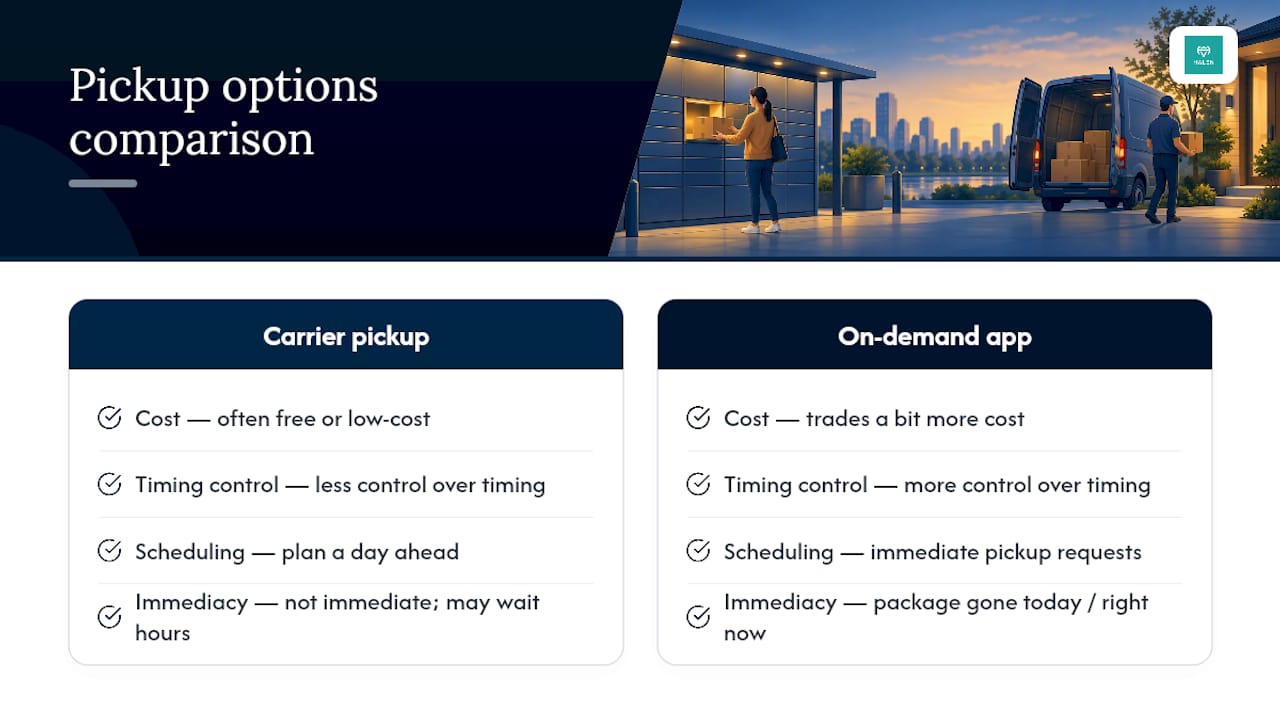
This is exactly where a platform like Halen fits. Its package delivery service pairs immediate pickup requests with transparent, upfront pricing, no surge charges tacked on when demand spikes, so you know the cost before you commit.
Skip the Wait With On-Demand Pickup Through Halen
Halen gets your package moving the moment you need it gone, not whenever a route driver happens to swing by. That matters most when you're shipping something time-sensitive, running a small business with unpredictable pickup needs, or you just don't want to plan your afternoon around a two-hour delivery window.

Because pricing stays upfront, you'll know your cost before the driver is even on the way. And since the service runs on one app that also handles rides, groceries, and more, package pickup becomes one more thing you can knock out without switching platforms. Open the Halen app to see if on-demand pickup is live in your area and request your first pickup in minutes.
Carrier Pages Worth Bookmarking
Keep these on hand for the next time you need to schedule, modify, or troubleshoot a pickup:
- USPS Package Pickup & Pickup on Demand FAQ: Covers eligibility rules, weight and size limits, and what happens when a pickup succeeds or fails.
- USPS Pickup on Demand terms and conditions: The full rulebook for the paid two-hour window service, including cancellation deadlines.
- UPS On-Call Pickup page: Where to book a one-time UPS pickup online or by phone, plus fee details.
- USPS Web Tools Package Pickup API: Reference for developers or shipping platforms that integrate scheduling directly.
Sources
- Package Pickup & Pickup on Demand® — USPS FAQ
- USPS Pickup on Demand terms and conditions
- Package Pickup API — USPS Web Tools
- One-Time Pickup | UPS - United States
FAQ
Can I Schedule a Package Pickup?
Yes. USPS, UPS, and FedEx all let you schedule pickups online, and most shipping platforms offer the same option built into their dashboards. USPS even lets you book free next-delivery pickup up to a year in advance if you're a regular shipper.
Is It "Scheduled Pickup" or "Pick Up" the Correct Spelling?
"Pickup" (one word) is the noun and adjective, as in "schedule a pickup" or "pickup service." "Pick up" (two words) is the verb phrase, as in "the driver will pick up your package." Carriers use "pickup" consistently across their scheduling tools and terminology.
Can I Get a Package Picked Up at My House?
Yes, both free and paid pickup services work at residential addresses, though residential pickups sometimes carry a small surcharge with carriers like UPS. You'll enter your home address during scheduling and specify where to leave the package, like your porch or front door.
How Do I Schedule a UPS Pickup for a Prepaid Label?
Log in to your UPS account, select On-Call Pickup, and enter your package details along with the prepaid label information already on the box. UPS will confirm your pickup window and may apply a same-day or future-day fee depending on when you need the driver to arrive.